

INTERNET
More ControlLess WorryCompletely Unrestricted

How
A smarter, premium alternative in how to manage your Families life online
It all starts with a one time purchase of your Halo Router (starting at $299) Then lock in your plan, and build the ultimate digital fortress for your family and your familes wellbeing.
Do you know we update our threat databases every 15 minutes?
Essential Plan
After the purchase of your router, you get lifetime access to our $0/month Essential Plan.
Once you plug it in, simply download the app, add your household devices, and assign them to individual family profiles. It gives you the immediate power to pause the internet for a specific person, a specific device, or the entire network whenever you need to.
To keep things safe, the Essential Plan also includes built-in network threat protection and a whole-home adult content filter that you can easily toggle on or off. It’s total, real-time boundary control with absolutely zero ongoing costs.
Premium Membership
The Premium Membership builds on our Essential features to give you absolute visibility and granular control over every profile in your home. By separating your network into three distinct lanes, your kids roam safely in their own digital space while your parental devices stay private and secure.
Through the app, you can customise the internet for each child— setting individual bedtime schedules, applying advanced content filters, and blocking problematic apps entirely.
Want to know how they spend their online time? Premium Insights shows you exactly which apps and websites they visit, without invading their private chats. Plus, with Device Approval, no new phone, console, or smart TV can hop onto your Wi-Fi without your direct permission.
$0 p/month
$15 p/month
Broadband
Engineering the complexity out of internet safety is what we do.
The ultimate all-in-one internet subscription.
Protection at the Source: Combines our physical network separation with high-speed broadband and a permanent, hands-free network firewall.
Zero Effort Safety: Dangerous adult content is intercepted automatically before it ever reaches your house, protecting your family without you lifting a finger.
Our cyber security team and partners spend their days discovering the latest scams and techniques so we can implement the necessary measures to prevent them from reaching Halo Internet customers.

How the App works
The Halo Protect App makes managing your child's online world effortless.
First, all our Halo routers have a built-in firewall that protects against known threats and malicious sites. On the kids network (using your own internet provider or ours) it will also automatically block harmful content like pornography, illegal material, and graphic violence without you having to install or program this in.
Then you have total control over the rest.
Our FREE Membership App allows you to pause the internet instantly for the whole family or individually by adding in child profiles and devices.
With our Premium Membership App you have advanced content filtering options that can create a safer space by blocking specific apps or entire categories (like Social Media or gaming), set healthy screen-time schedules, and track behavioral insights for each device.


Pause the internet with the touch of a button
Choose to block certain categories
Instantly stop internet access for the kids' network when it's dinner time or family time. It can automatically turn back on when the duration is up.
Available on both $0 Essential Plan & $15 Premium Membership
Not ready for them to play multiplayer games or use social platforms? Pick exactly what gets through the filters and what doesn't, category by category.
Available on $15 Premium Membership only
.png)
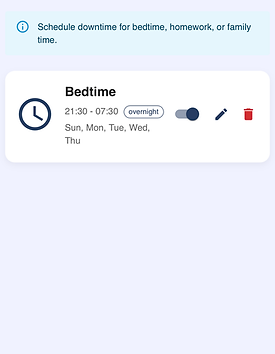
Easier Bedtime Routines
Set up automatic schedules so the internet limits follow the family structure without arguments. Establish clear digital boundaries entirely automatically.
Available on $15 Premium Membership only


Real Time Insights
Want a quick look at who's online, how long they have been online and what they are looking at, our real time insights give you just that.
Available on $15 Premium Membership only
Disclaimer: You will be able to see they are on Apps like Snapchat or TikTok but you wont be able to see what they are looking at or who they are chatting to.
Key Features
Explore the powerful features that run silently in the background of your Halo Network Router
%20(20).png)
Separate WiFi Network
Our Tri-Fi technology broadcasts two distinct networks. The "Kids" network is shielded by our enterprise-grade filters, while the "Main" network offers unrestricted, high-speed access for adults. Everyone gets what they need.
%20(21)_edited.jpg)
Child Profiles
Every child is different. Create unique profiles to assign specific devices (like a teenager's phone vs a toddler's tablet) to tailored rulesets. Customise filtering levels and bedtimes per profile.
%20(15).png)
AD & Tracker
Blocking
We block malicious ads, popups, and intrusive trackers at the network level. Not only does this protect your privacy and shield children from manipulative advertising, but it also makes the internet significantly faster.
%20(28).png)
Robust Content Filtering
Our intelligent filters automatically enforce SafeSearch on Google and YouTube. We aggressively block adult content, malware, phishing sites, and potentially harmful domains before the data ever enters your home.
%20(22).png)
Pause with Auto-Resume
Dinner time? Homework? Instantly pause the Kids WiFi with a single tap. Set a duration and the internet automatically resumes when the time is up. No more arguing, no more forgetting to turn it back on.
%20(27).png)
Scheduled Downtime
Establish healthy boundaries. Set automatic schedules for bedtimes or screen-free periods. The Kids network goes offline automatically, helping your family stick to their routines without you playing the bad guy.
